SSHole (CVE-2026-123158): is your server affected?
An OpenSSH flaw that lets attackers log in to password-locked accounts on Alpine and other musl-based systems. How to check, patch and protect against it.
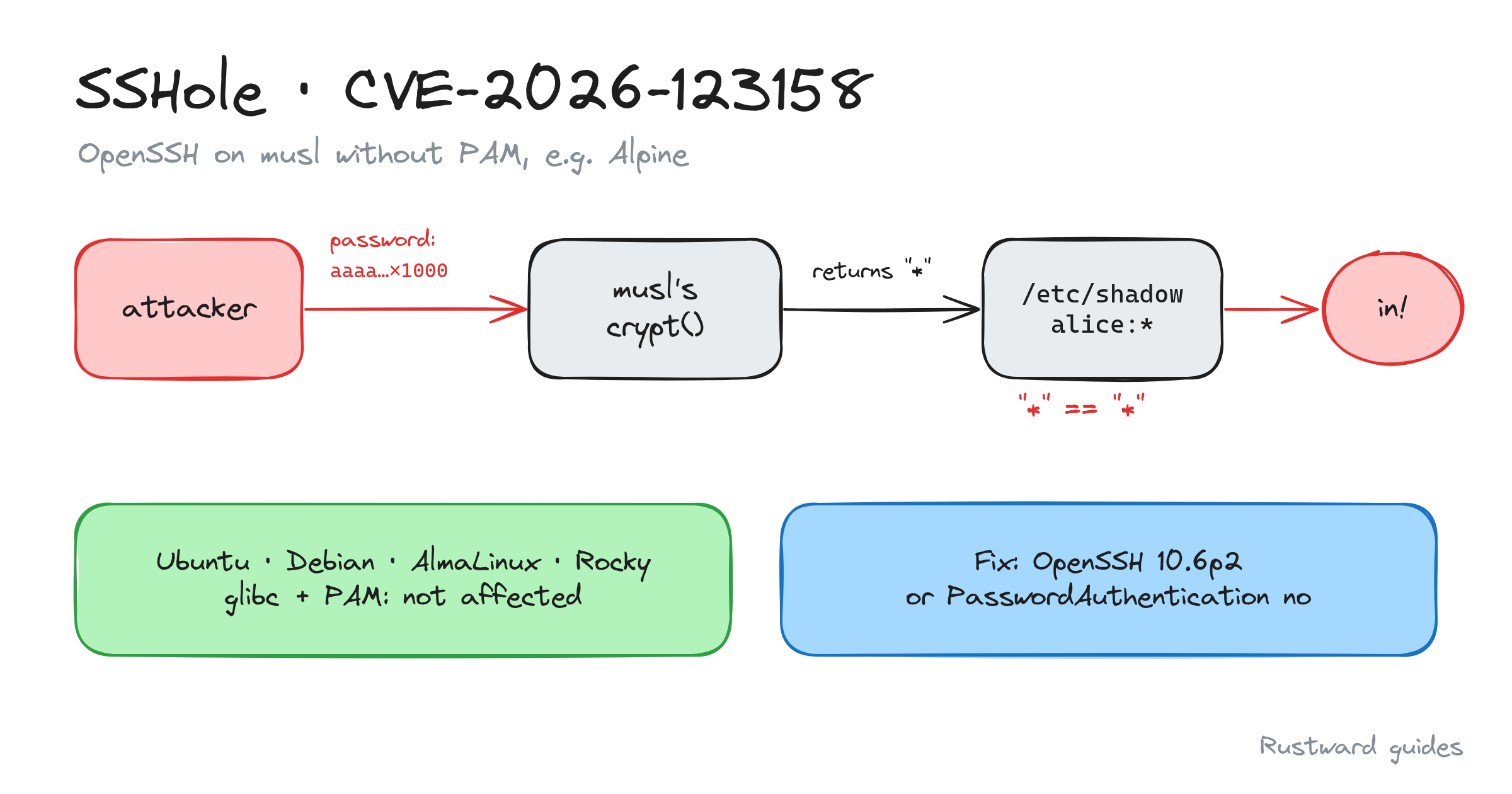
On 5 November 2026, the OpenSSH project disclosed CVE-2026-123158, now known as SSHole. It lets an attacker log in over SSH to accounts that were meant to have no usable password. Attacks started within days, and CISA added it to its Known Exploited Vulnerabilities catalog on 9 November.
The good news is that most servers aren’t affected. In this guide we’ll work out whether ours is, and fix it if it is.
The short version#
- Our standard images aren’t affected. Ubuntu, Debian, AlmaLinux and Rocky Linux all use glibc and PAM, and the bug needs neither of those to be there.
- Alpine Linux is affected, along with anything else built on the musl C library without PAM. That includes servers installed from an Alpine ISO, and containers running
sshdon an Alpine base image. - The fix is OpenSSH 10.6p2, or the patched package from your distribution.
- Turning off password logins blocks the attack even before we patch.
How it works#
On a server without PAM, sshd checks a password by hashing what we typed and comparing it with the hash in /etc/shadow. Accounts that shouldn’t log in with a password often have a * there instead of a hash.
On musl-based systems, a very long password, a few hundred characters, makes the hashing function fail and return *. That matches the * in the shadow file, so sshd lets the attacker in. The OpenSSH fix refuses to treat stored hashes that short as real passwords.
Three things have to be true for a server to be vulnerable:
- OpenSSH older than 10.6p2, built against musl,
- built or configured without PAM,
- with password logins allowed, which is OpenSSH’s default.
Check which C library we’re on#
grep PRETTY_NAME /etc/os-release
PRETTY_NAME="Ubuntu 24.04.1 LTS"
ldd --version 2>&1 | head -n 1
ldd (Ubuntu GLIBC 2.39-0ubuntu8.3) 2.39
If it says Ubuntu, Debian, AlmaLinux or Rocky, and ldd mentions GLIBC or GNU libc, we’re not affected and can stop here. If it mentions musl, or the system is Alpine, we keep going.
Check containers too#
A host on Ubuntu can still run a vulnerable sshd inside a container. If we use Docker, we look for containers with SSH inside:
docker ps --format '{{.Names}}\t{{.Image}}\t{{.Ports}}'For any container that runs an SSH server, we check its base:
docker exec CONTAINER_NAME cat /etc/os-releaseCheck the SSH settings#
On an affected system, we check whether password logins are on and PAM is off. sshd -T prints the settings it’s really using:
sudo sshd -T | grep -Ei '^(passwordauthentication|usepam|kbdinteractiveauthentication) '
passwordauthentication yes
kbdinteractiveauthentication no
If passwordauthentication yes appears and usepam is no or missing, as here, the server is exposed.
Turn off password logins now#
This blocks the attack straight away, before we’ve patched anything. First we make sure we can log in with an SSH key, because we’re about to turn passwords off. Then:
echo 'PasswordAuthentication no' | sudo tee /etc/ssh/sshd_config.d/00-no-passwords.conf
echo 'KbdInteractiveAuthentication no' | sudo tee -a /etc/ssh/sshd_config.d/00-no-passwords.conf
sudo sshd -t && sudo rc-service sshd restart
On Alpine, sshd is managed by OpenRC, hence rc-service. Alpine doesn’t always have sudo; if it’s missing, we run these as root or with doas.
No sshd_config.d directory?
Older setups don’t read /etc/ssh/sshd_config.d/. If our /etc/ssh/sshd_config has no Include /etc/ssh/sshd_config.d/*.conf line near the top, we put the two settings at the top of sshd_config itself instead:
PasswordAuthentication no
KbdInteractiveAuthentication no
# The rest of the file stays as it is.
We keep our current session open and check from a new terminal that we can still log in with our key.
Patch OpenSSH#
Alpine released fixed packages on the day of the disclosure, back to older supported branches. We update and restart:
sudo apk update
sudo apk upgrade openssh
apk info -v openssh-server
sudo rc-service sshd restart
The restart matters. Upgrading the package doesn’t replace the sshd that’s already running. To confirm our branch’s package has the fix, we check Alpine’s security tracker.
For containers, we pull the updated base image and rebuild, rather than patching inside the running container:
docker pull alpine:latest
docker compose build --pull && docker compose up -d
Look for signs someone got in#
If the server was exposed before we patched, we check the SSH log for password logins we don’t recognise:
sudo grep -E 'Accepted (password|keyboard-interactive)' /var/log/messages /var/log/auth.log 2>/dev/nullWe also look for SSH keys or users we didn’t add:
cat /root/.ssh/authorized_keys /home/*/.ssh/authorized_keys 2>/dev/null
awk -F: '$3 >= 1000 || $3 == 0' /etc/passwd
If anything looks wrong, our recovery plan guide covers what to do next. In short: assume the server is compromised, and rebuild it rather than trying to clean it.
Next steps#
- Harden SSH on every server, so the next SSH bug has less to work with.
- Find out whether a CVE affects your server the next time one makes the news.
Sources: BleepingComputer, Red Hat, OpenCVE, Computingforgeeks.