Audit what your server exposes
List what's listening, check it from the outside, and close or lock down anything that shouldn't be public, like Redis, Postgres or an admin panel.
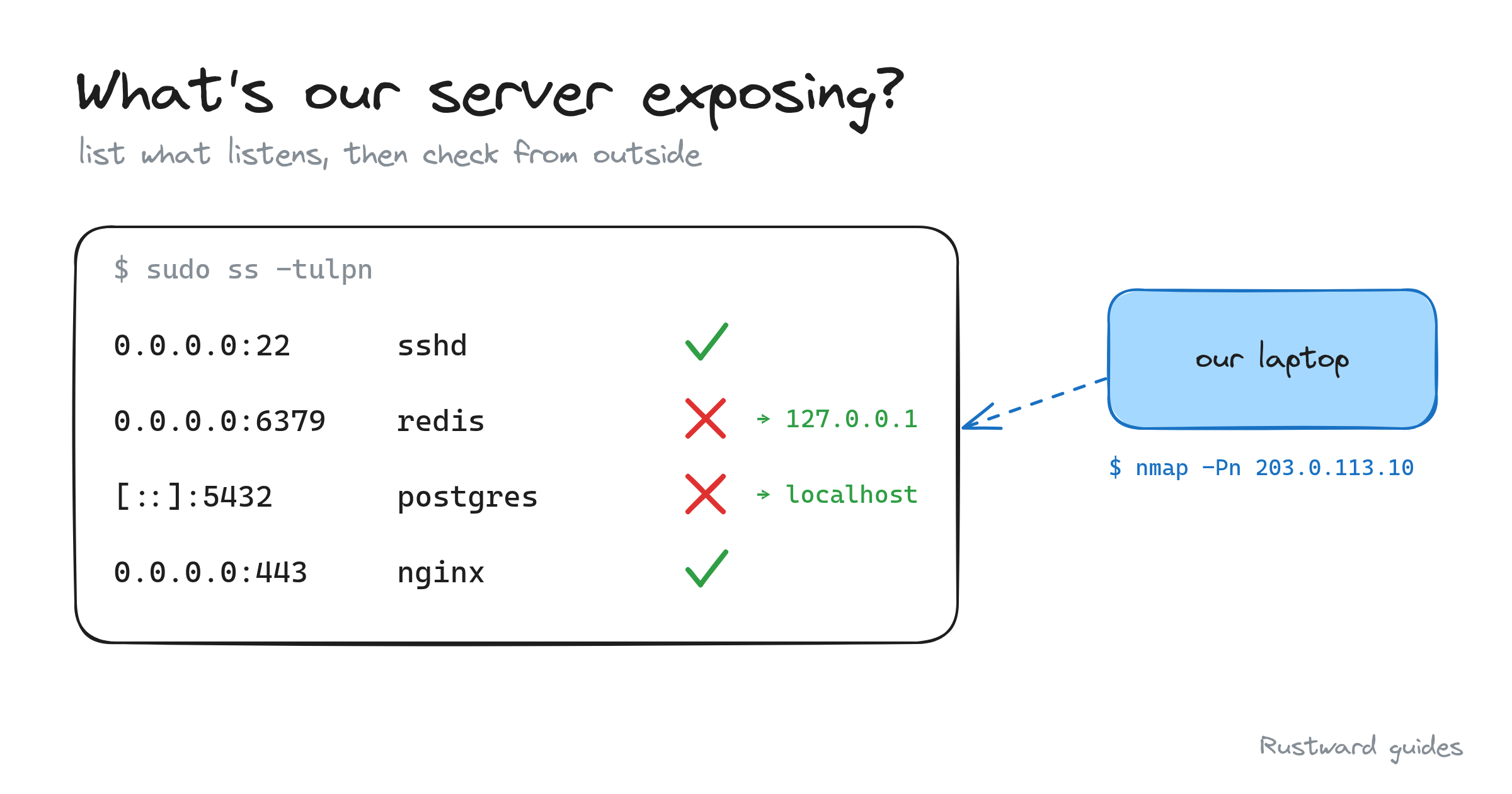
Every service listening on a public address is something an attacker can try. Some we want there, like SSH or a web server. Others got there by accident: a database that listens on every address, a debugging tool we forgot to stop, a package that started a service when we installed it.
In this guide we’ll list everything that’s listening, check what the internet can actually reach, and close what shouldn’t be open. It’s worth doing on every new server, and again every few months.
List what’s listening#
sudo ss -tulpn
Netid State  Local Address:Port  Peer Address:Port Process
tcp   LISTEN 0.0.0.0:22           0.0.0.0:*         users:(("sshd",pid=812,fd=3))
tcp   LISTEN 0.0.0.0:6379         0.0.0.0:*         users:(("redis-server",pid=1034,fd=6))
tcp   LISTEN 127.0.0.1:5432       0.0.0.0:*         users:(("postgres",pid=990,fd=7))
tcp   LISTEN [::]:443             [::]:*            users:(("nginx",pid=1201,fd=8))
That shows TCP and UDP sockets that are listening, with the program behind each one. (We’ve trimmed a few columns here.) The Local Address column is what matters:
| Address | Who can connect |
|---|---|
127.0.0.1:6379, [::1]:6379 |
Only programs on this server. Usually what we want. |
0.0.0.0:6379, [::]:6379 |
Anyone who can reach the server, on any address. |
203.0.113.10:6379 |
Anyone who can reach that specific public address. |
For each line on 0.0.0.0, [::] or a public address, we ask: does this need to be reachable from outside? SSH and a web server on 80 and 443, yes. A database, cache or admin tool, almost never. In the example above, Redis on 0.0.0.0:6379 is the one to fix.
Find out what each one is#
If a program name doesn’t ring a bell, we look up the service it belongs to, using the pid from ss:
systemctl status 1034
● redis-server.service - Advanced key-value store
     Active: active (running) since Mon 2026-11-23 09:12:44 UTC
To see every service that’s running:
systemctl list-units --type=service --state=runningStop what we don’t need#
If we don’t use it, we stop it and keep it from starting again:
sudo systemctl disable --now SERVICE_NAMEIf we don’t need the software at all, we remove the package. Less installed means less to patch.
Keep what we need, but only on localhost#
Most services that only our own apps talk to can listen on localhost instead. The setting for a few common ones:
bind 0.0.0.0
bind 127.0.0.1 -::1
protected-mode yeslisten_addresses = '*'
listen_addresses = 'localhost'bind-address = 0.0.0.0
bind-address = 127.0.0.1The paths depend on the distribution and version. After the change, we restart the service and run ss -tulpn again to check it moved to 127.0.0.1.
Reaching it from our own computer
When we need to reach one of these from our own computer, we use an SSH tunnel rather than opening the port:
ssh -L 5432:localhost:5432 alice@203.0.113.10While that’s connected, our computer’s localhost:5432 goes to the server’s database, encrypted over SSH.
Check from the outside#
ss tells us what’s listening. A scan from outside tells us what’s actually reachable, after the firewall and Docker have had their say. From our own computer:
nmap -Pn 203.0.113.10
PORT     STATE SERVICE
22/tcp   open  ssh
443/tcp  open  https
6379/tcp open  redis
That scans the 1,000 most common ports. nmap -Pn -p- 203.0.113.10 scans all of them, which is slower.
Only scan your own servers
Scanning servers you don’t own or have permission to test can break the terms of service of your network provider, including ours.
Anything that shows up as open that we didn’t mean to open is the first thing to fix. If a Docker container is behind it, the firewall guide explains why the firewall didn’t stop it.
Check who can log in#
While we’re auditing, it’s worth checking accounts and keys too. Root and real users, with their shells:
awk -F: '$3 == 0 || $3 >= 1000 {print $1, $7}' /etc/passwd
root /bin/bash
alice /bin/bash
nobody /usr/sbin/nologin
Then the keys that can log in, and the last 20 logins:
sudo cat /root/.ssh/authorized_keys /home/*/.ssh/authorized_keys
last -n 20
Keys for people who’ve left, or that we don’t recognise, come out of authorized_keys. Removing a key from your workspace in the dashboard doesn’t remove it from servers that already have it.
Next steps#
- Set up a firewall that blocks by default, so the next service that appears by accident stays private.
- Keep a server patched automatically for the services we do keep.